
100 Ways to Use the Monthly Notes Pages in Your Programming and Reflection Diary
Discover 100 practical ways Early Childhood educators can use the monthly notes, reflection, and photo pages in their Programming and Reflection Diary to support observations, critical reflection, planning, child voice, and everyday practice.

The monthly programming notes, reflection notes, and photo/drawing pages in the Programming and Reflection Diaries are intentionally open-ended. They are designed to adapt to your service, philosophy, team, and way of working — not force you into a rigid system.
Many educators use these pages as the “thinking space” behind the weekly program — a place to capture observations, reflect on practice, map learning, document conversations, gather evidence, and make the planning cycle more visible.
Below are 100 practical ways these pages can support programming, reflection, critical thinking, collaboration, and everyday practice in Early Childhood Education and Care.
Programming and Planning Ideas
- Track emerging children’s interests across the month
- Create a monthly mind map of inquiry topics
- Record spontaneous learning moments to revisit later
- Brainstorm extension ideas for next month's programs
- Map intentional teaching goals for the month
- Record children’s questions and wonderings
- Create a “where to from here?” planning page
- Track long-term projects or investigations
- Plan provocations for different learning areas
- Map seasonal or community events into the program
- Keep a running list of group learning ideas
- Plan experiences linked to EYLF outcomes
- Record curriculum links for emerging interests
- Create a loose monthly overview before weekly programming
- Record follow-ups from previous observations
- Plan for continuity of learning across weeks
- Track which learning outcomes have been strongly represented
- Identify gaps in programming focus
- Plan sustainability-focused experiences
- Record ideas for cultural learning experiences
- Plan invitations to play or inquiry setups
- Keep a brainstorming page for loose parts ideas
- Map indoor and outdoor learning opportunities
- Record community connections or excursions ideas
- Create a monthly “focus children” planning page

Observation and Documentation Ideas
- Running records
- Anecdotal observations
- Learning stories
- Jottings throughout the day
- Time sampling observations
- Event sampling observations
- Environment tracking observations
- Social interaction tracking
- Behaviour pattern reflections
- Observation summaries before formal documentation
- Group observations
- Track individual children's goals
- Outdoor learning observations
- Risk-taking and resilience observations
- Language development tracking notes
- Gross motor development notes
- Fine motor progression tracking
- Sensory play observations
- STEM exploration observations
- Creative arts observations
- Dramatic play observations
- Child voice documentation
- Dictated stories from children
- Photo annotations
- Quick notes linked to future observations

Reflection and Critical Reflection Ideas
- Weekly or monthly critical reflections
- Reflect on what worked well in the environment
- Reflect on what didn’t work and why
- Reflect on children’s engagement levels
- Reflect on routines and transitions
- Reflect on educator interactions
- Reflect on intentional teaching strategies
- Reflect on inclusion and participation
- Reflect on equity and high expectations
- Reflect on sustainability practices
- Reflect on cultural responsiveness
- Reflect on family engagement
- Reflect on children’s agency in the program
- Reflect on behaviour guidance approaches
- Reflect on room atmosphere and flow
- Reflect on staffing arrangements impacting practice
- Reflect after difficult days or challenging weeks
- Reflect on professional conversations with colleagues
- Reflect on professional development learning
- Reflect on changes made to the environment
- Reflect on resource choices and accessibility
- Reflect on group dynamics
- Reflect on how the program aligned with children’s voices
- Reflect on risk-benefit opportunities provided
- Reflect on how documentation informed planning

Educational Leader and Team Collaboration Ideas
- Record mentoring conversations with Educational Leaders
- Keep notes from reflective discussions with the team
- Document room meeting outcomes
- Record action points from staff and room meetings
- Track professional goals for educators
- Document follow-up actions after observations
- Record feedback from Educational Leaders
- Brainstorm improvement ideas collaboratively
- Record critical reflection prompts discussed as a team
- Track progress towards QIP goals
- Record practice changes implemented after reflection
- Document team agreements about routines or practice
- Record policy review discussions
- Keep notes from professional inquiry projects
- Track goals from performance reviews or mentoring

Environment and Resource Planning Ideas
- Sketch room layouts or environment changes
- Create outdoor area redesign ideas
- Plan rotations of resources
- Record which resources supported engagement best
- Track children’s use of different learning spaces
- Create shopping or resource wish lists
- Plan calm spaces or wellbeing areas
- Map sustainability changes in the environment
- Record children’s feedback about spaces
- Create before-and-after reflections of environment changes

Ideas Specifically for the Photo / Drawing Pages
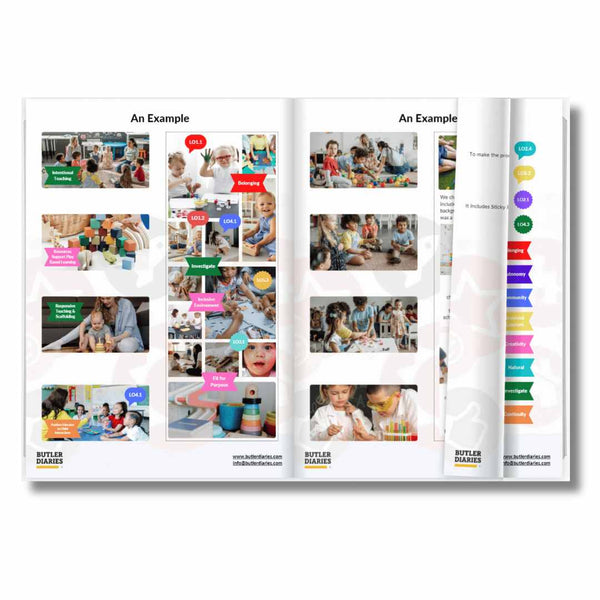
These pages are far more than just “photo evidence”. Many services now use them as broader evidence-of-learning pages that include drawings, quotes, planning maps, reflections, and visual documentation.
Some additional ways educators use these pages include:
- Children’s drawings with educator annotations
- Photo collages showing progression over time
- Scrapbooking learning journeys
- Visual mind maps
- Family contributions and photos from home
- Documentation of project work
- “Our Month in Review” pages
- Learning journey timelines
- Capturing group collaboration moments
- Recording children’s theories visually
- Adding children’s comments beside photos
- Before-and-after project documentation
- Educator reflection alongside photos
- Environment transformation comparisons
- Visual evidence for Assessment and Rating discussions

Why These Pages Matter
One of the strengths of the Programming and Reflection Diaries are that these pages make the planning cycle visible in a practical way. Rather than creating separate documents for every idea, reflection, or observation, educators can keep thinking, planning, reflection, and evidence connected in one place.
These pages can help services show:
- Ongoing assessment and planning
- Critical reflection in practice
- Intentional teaching decisions
- Child-led curriculum development
- Collaboration between educators
- Evidence of learning over time
- Connections between observations and future planning
- Professional growth and reflective practice
- Family and community contributions
- Continuous improvement processes
Related Articles
-
What Counts as Evidence of Learning? Beyond Photographs in ECEC Documentation
-
10 Ways to Be Safer With Photographs in Early Childhood Education and Care
-
A Guide to Writing Observations in Early Childhood Education
-
FAQs on the Weekly Programming and Reflection Child Educator Diary
- How to Show Learning Over Time (Not Just in One Week)